

ONLINE USER MANUAL
KB700 Fan Jump Starter
Use this online guide for setup, vehicle starting, air-duster operation, charging and safety.
Online edition based on the English manual dated May 7, 2026.Product overview
KB700 is a multifunctional emergency power unit for compatible 12V vehicle batteries. It combines vehicle jump starting, a three-speed air duster, a 2W emergency light and 5V/2A USB device charging.
Model: KP-700
Cell capacity: 7,200mAh / 26.64Wh
Vehicle reference: up to 6.0L gasoline or 4.0L diesel
Starting current: 500A
Peak current: 1,000A
Input: Type-C 5V/2A
Output: USB-A 5V/2A
Typical charging time: about 4 hours
High-speed fan power: 360W
Wind pressure: 550g
Product size: 203 × 85 × 36mm
The printed manual identifies the product unit, instructions, charging cable, smart clamps and air-nozzle accessory as the core supplied items. Check the product listing and your package for the complete current bundle.
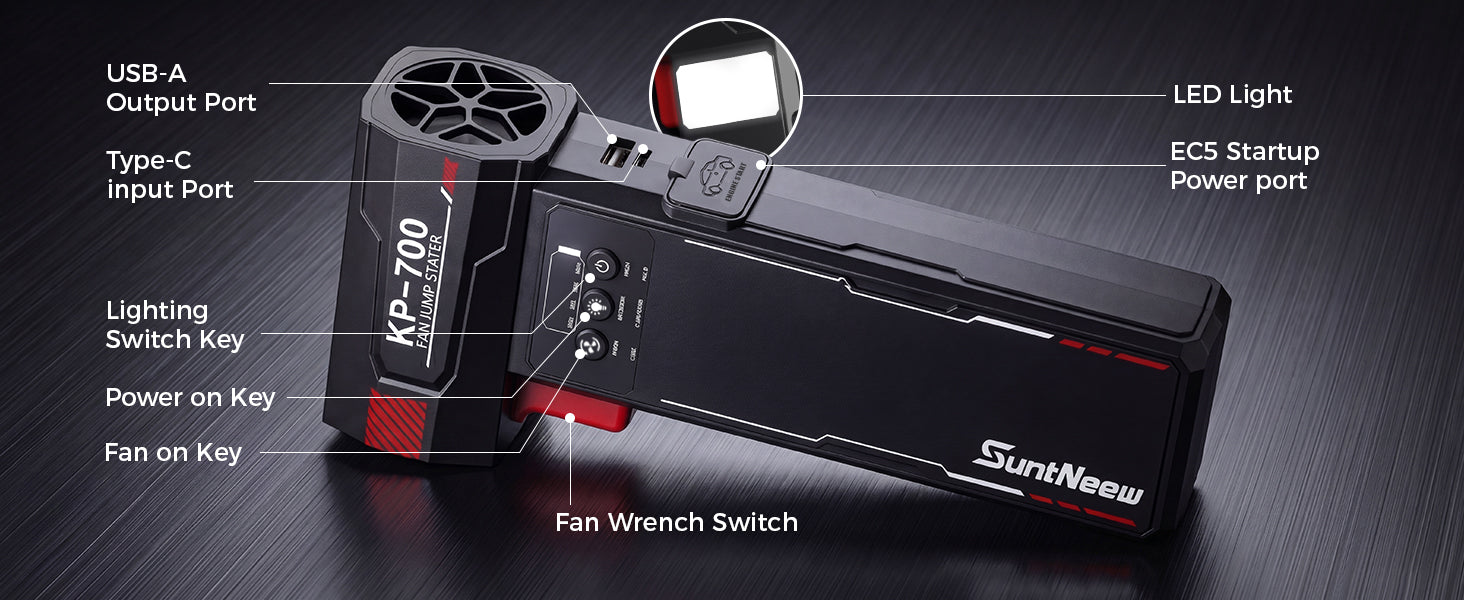
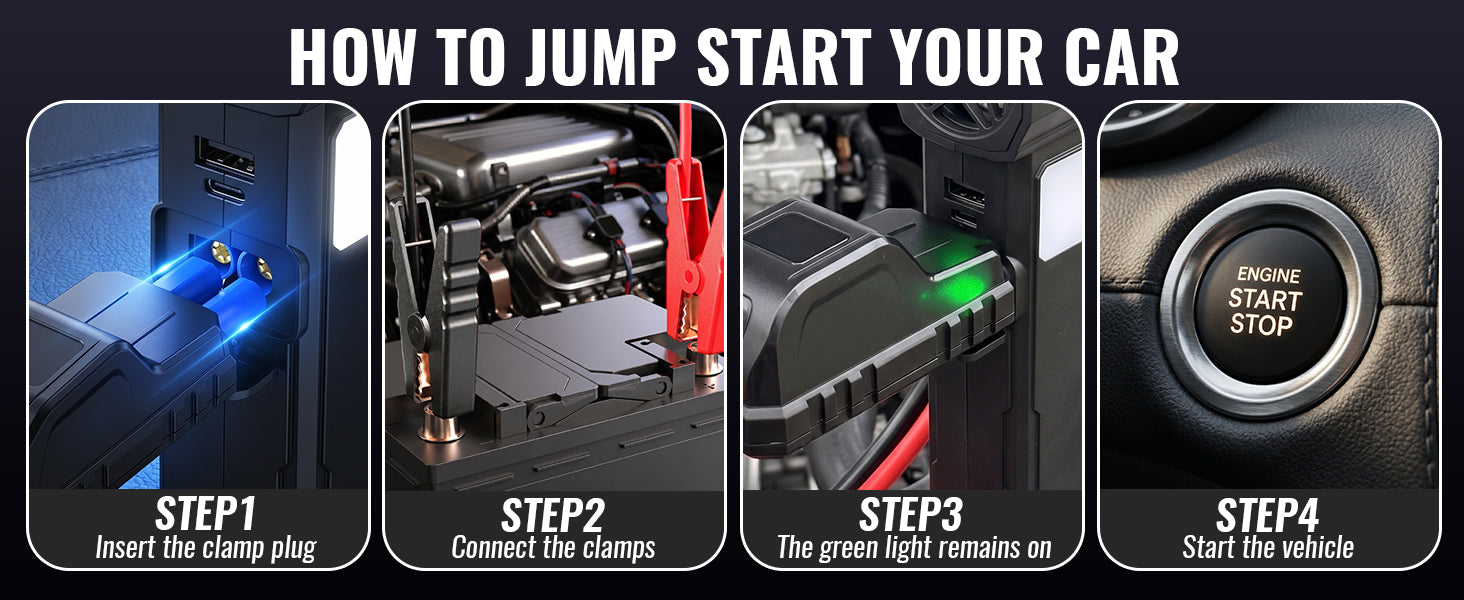
Jump-start a vehicle
Use only with a compatible 12V vehicle battery. Charge KB700 to at least 50% before attempting a jump start.
- Turn off the vehicle and all electrical loads.
- Insert the smart-clamp plug fully into the EC5 startup port.
- Connect the red clamp to the positive battery terminal, then connect the black clamp to the negative terminal.
- Confirm the smart-clamp indicator shows the ready condition, then start the vehicle.
- After the engine starts, disconnect the clamp assembly from KB700 and remove both clamps from the battery terminals within 30 seconds.
- Leave the vehicle engine running.
If the engine does not start, wait at least one minute before another attempt. Do not make more than three consecutive attempts. Check the clamp connection, clean dirt or corrosion from the battery-terminal contact area, and investigate other possible vehicle faults.
Fan, light and device charging
Air duster: Press and hold the power button until the battery indicator illuminates. Use the fan control to start airflow, then select one of the three speed levels. Keep loose hair, clothing, fingers and objects away from the inlet and fan blades.
Emergency light: Turn on the main power. Press and hold the light button for about two seconds to turn on the 2W LED. Press again to cycle through Steady, Flashing and SOS modes.
Device charging: Connect a compatible phone or tablet to the USB-A 5V/2A output. This is intended as emergency device power and should not exceed the rated output current.
Recharge KB700: Connect a 5V/2A power source to the Type-C input. Typical charging time is about four hours. Do not cover the product while charging.
Safety and care
- Check the battery level before use. Do not jump-start a vehicle when the remaining charge is below 50%.
- Insert the EC5 smart-clamp plug completely. A loose connection can reduce starting performance and overheat or damage the connector.
- Do not make repeated high-frequency starting attempts. Wait at least 30 seconds between ignition attempts and at least one minute after a failed start.
- Once the smart clamps are connected and show the ready condition, start the vehicle without unnecessary delay.
- If the vehicle does not start, check the clamp connection and battery terminals. Stop after three consecutive attempts and investigate the vehicle fault.
- Do not store or use the product in high temperatures, direct strong sunlight, strong magnetic fields or near fire. If it becomes wet, stop using it and allow it to dry naturally.
- Use the product only for its documented functions and within its ratings.
- Do not disassemble, puncture, modify or attempt an unqualified repair.
- Do not connect appliances or loads that exceed the rated USB output current.
- Avoid impact, throwing, crushing, trampling or squeezing the product.
- This product is not a toy. Keep it away from children; the printed manual recommends users be over 16 years old.
- If stored for a long period, recharge it at least once every three months.
- Do not insert branches or other objects into the air inlet or fan blades.
- Use in a clean, dry environment. KB700 is not marketed as waterproof; do not rinse or submerge it.
FCC notice
This device complies with Part 15 of the FCC Rules. Operation is subject to the following two conditions: (1) this device may not cause harmful interference, and (2) this device must accept any interference received, including interference that may cause undesired operation.